
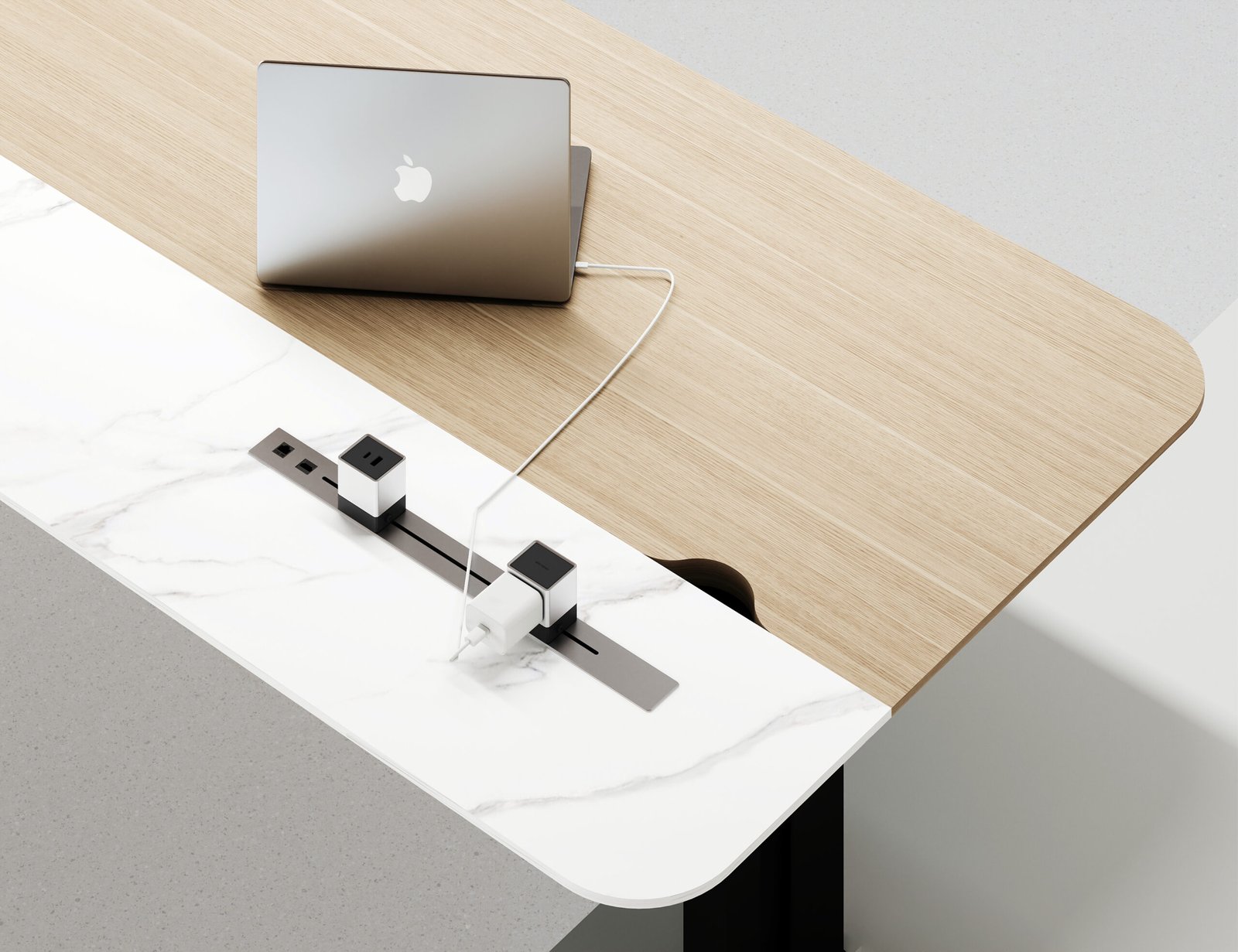
A desktop power socket may be one of the smallest components in an office furniture project, but choosing the wrong one can create problems that are surprisingly difficult to correct later.
The socket has to work with the table design, available installation space, cable route, user requirements and electrical standard of the destination market.
It also needs to look like it belongs in the furniture.
For conference tables, executive desks, training tables and open workstations, the decision is therefore not simply:
How many sockets do we need?
A better starting point is:
How should users access power, and how should that access be integrated into the furniture?
NORDA’s desktop power socket range includes several structural directions, including sliding, flip/lid, rotary, vertical pop-up and surface/clamp solutions.
Each solves the same basic problem differently.
Start With the Furniture Application
Before comparing individual socket models, identify where the module will actually be installed.
A conference table, workstation and executive desk do not necessarily need the same solution.
Conference Tables
Meeting rooms often need power access that remains easy to reach from several seating positions.
The module may need to support laptops, mobile devices and other meeting equipment while keeping the tabletop visually organized.
For larger tables, the number and position of power modules can matter as much as the type of module itself.
Workstations
Open-plan workstations usually prioritize convenient everyday access and repeatable installation across many desk positions.
A project with 50 workstations has a different requirement from one executive desk.
Installation consistency, cable routing and ease of replacement become especially important when the same module is repeated across an office floor.
Executive Desks
Executive furniture often places more emphasis on visual integration.
The socket should remain accessible without making the desk surface feel overly technical or cluttered.
Its finish, opening mechanism and position should therefore be considered together with the desk design.
Training and Flexible Tables
Training environments may require furniture to be moved or reconfigured more frequently.
In these applications, buyers should think carefully about how the power module connects to the furniture and how the table connects to building power.
Recommended image here: use a real NORDA conference table or workstation image that clearly shows integrated desktop power access.
The Five Main Structural Directions
Different desktop socket mechanisms create different user experiences.
For NORDA’s current product planning, the range can be understood through five main families.
1. Sliding Power Sockets
A sliding module keeps the power interface concealed until access is needed.
The AM-1301 Sliding Socket is the current NORDA reference for this product direction.
Sliding designs can work well where the project wants:
- a cleaner closed tabletop
- concealed connectivity when not in use
- controlled access to the module
- a more integrated furniture appearance
For procurement teams, the important questions are not only how the cover moves.
Also confirm:
- overall module dimensions
- required installation opening
- space below the tabletop
- cable route
- actual electrical configuration
- maintenance access
A product that looks compact from above may require more installation space underneath the table.
2. Flip / Lid Power Sockets
Flip and lid-style modules use a cover that opens to reveal the connection area.
The AM-145 Flip Socket with Brush is one current NORDA reference for this family.
This type of solution is often useful when buyers want the socket concealed when it is not being used while still keeping access straightforward during meetings or daily work.
However, not every flip socket is structurally identical.
Within the same broad family, products may differ in:
- single-side or double-side access
- cover shape
- opening direction
- installation geometry
- available internal space
- module arrangement
This is why buyers should not assume that two visually similar flip sockets use the same cut-out or electrical configuration.
For project orders, confirm each model separately.
3. Rotary Power Sockets
Rotary designs use a rotating mechanism to move the connection interface between a concealed and accessible position.
NORDA’s AM-801 Electric Rotary Socket represents this design direction.
Rotary units are often considered when the furniture concept calls for a more integrated or mechanical opening experience.
When evaluating a rotary model, check:
- rotation method
- installation depth
- available space below the tabletop
- service access
- cable movement
- how the module behaves when open and closed
For larger commercial projects, mechanism complexity also makes sample testing particularly useful.
A product may look impressive in a photograph, but procurement teams should still evaluate how it feels during repeated real-world operation.
4. Vertical Pop-Up Power Sockets
Vertical pop-up modules rise from the tabletop when required and retract when not in use.
This can create a compact footprint at the surface while providing access to multiple connection positions vertically.
For projects considering a vertical pop-up solution such as AM-1601, useful checks include:
- installation depth below the tabletop
- extension height
- available cabinet or leg clearance
- opening and closing method
- cable routing
- service access
This is especially important in furniture with drawers, modesty panels, cable trays or structural beams below the worktop.
The visible tabletop opening may be small while the internal installation requirement is considerably larger.
5. Surface / Clamp Power Sockets
Not every office project should cut a permanent opening into the tabletop.
Surface-mounted or clamp-style solutions can be useful when the project prioritizes easier installation, repositioning or reduced modification to the furniture.
NORDA currently uses AM-1701 as the reference direction for this family.
Potential applications can include:
- workstations
- retrofit projects
- flexible desk layouts
- locations where permanent cut-outs are undesirable
The exact mounting method still needs to be confirmed for each model.
Do not assume a module is clamp-mounted, surface-mounted or embedded simply from its appearance.
For procurement, installation truth matters more than the marketing category name.
Choose the Mechanism Before Choosing the Ports
It is tempting to compare desktop power sockets by counting visible outlets and USB ports.
That should come later.
First decide how the power module needs to interact with the furniture.
A useful decision sequence is:
- Where will the module be installed?
- Should it be visible or concealed when not in use?
- Can the tabletop be permanently cut?
- How much space is available below the surface?
- How will cables reach the module?
- How will users access it from their seats?
- Then — what electrical and connectivity configuration is required?
This sequence prevents a common project problem: choosing an attractive socket first and discovering later that it does not physically fit the table.
Check the Cut-Out Before Furniture Production
For embedded power modules, the installation opening is one of the most important dimensions in the entire specification.
Do not treat:
- overall product dimensions
- cover dimensions
- body dimensions
- cut-out dimensions
as interchangeable.
They are not necessarily the same.
Before mass production, the furniture manufacturer and power-module supplier should confirm exactly which dimension the tabletop needs.
This matters even more when sockets are being integrated into stainless steel furniture, because changing the opening after fabrication may be much less convenient than confirming it before cutting.
Ideally, the final cut-out is approved together with the table drawing.
Think About What Happens Under the Table
Most product photographs show the top.
Project problems often happen underneath.
Before approving a desktop power module, check whether it conflicts with:
- table frames
- cross beams
- drawers
- cabinets
- modesty panels
- cable trays
- lifting mechanisms
- height-adjustable desk structures
This is particularly important for height-adjustable desks.
A power module that works perfectly in a fixed conference table may interfere with the structure or moving cables of an adjustable desk.
The furniture drawing and socket drawing should therefore be reviewed together.
Plan the Cable Route, Not Just the Socket Position
Integrated power is not complete simply because a module is installed in the tabletop.
There still needs to be a practical connection path.
Think through the full route:
building power → furniture → under-table cable management → desktop module → user device
If any part of this path is ignored, the finished office can still end up with loose extension cords, exposed adapters or cables crossing circulation areas.
For conference rooms in particular, the table position should be coordinated with the building-side electrical plan before installation.
Recommended image here: use a real NORDA desktop socket detail showing the module installed in a table, preferably with the cable-management context visible.
Confirm the Destination Market Before Finalizing the Electrical Configuration
Office furniture may be sold internationally, but electrical requirements are not universal.
Projects can differ in:
- outlet format
- voltage
- plug type
- USB requirements
- data requirements
- certification requirements
- local installation rules
For that reason, the physical socket model and the electrical module configuration should not automatically be treated as the same decision.
A buyer may like the mechanical design of one product while needing a different electrical configuration for the destination market.
When requesting a quotation, provide the destination country early.
That gives the supplier a clearer basis for reviewing the required configuration.
Do Not Infer Features From Product Photos
This is especially important when sourcing desktop connectivity products.
A photograph may appear to show:
- USB
- USB-C
- wireless charging
- data ports
- media connections
- multiple AC outlets
But visible appearance alone should not be used as the final technical specification.
The exact module configuration should come from confirmed product documentation or the quotation.
This protects both buyer and supplier from a simple but common problem: quoting one configuration while the customer expects another because of a product image.
Match the Finish to the Furniture
Desktop sockets are highly visible.
Even when they occupy only a small area, the finish can affect how integrated the finished table feels.
Consider how the module works with:
- stainless steel
- black frames
- brushed metal
- wood-grain worktops
- white surfaces
- dark executive furniture
- neutral commercial interiors
The objective is not necessarily to make the socket invisible.
It is to make it look intentional.
For projects using several table types, buyers may also want to keep a consistent power-access direction across conference tables, executive desks and workstations.
Standardize Where Possible on Large Projects
For a single table, choosing one specialized socket is easy.
For a project with many rooms and workstations, too many different power modules can create unnecessary complexity.
Every additional model may introduce another:
- cut-out
- cable route
- spare part
- installation method
- finish
- electrical configuration
Where practical, project teams can standardize a smaller number of approved socket families for repeated applications.
For example:
- one solution for conference tables
- one for executive desks
- one for workstation groups
This can simplify furniture drawings, procurement, installation and future replacement.
Sample Testing Is Worth More Than a Product Photo
For repeat orders or larger commercial projects, a physical sample can answer questions that specifications alone may not.
Check:
- opening and closing feel
- cover alignment
- surface finish
- installation fit
- cable clearance
- user access
- connection stability
- interaction with the actual tabletop
If the power module will be repeated across dozens or hundreds of furniture positions, identifying a small installation problem before mass production can save much more work later.
What Should Buyers Send With an RFQ?
A useful desktop power socket enquiry should include more than a model number.
Where possible, provide:
- preferred socket model or mechanism
- intended furniture type
- estimated quantity
- destination market
- tabletop thickness
- available installation space
- required electrical configuration
- charging requirements
- data or media requirements
- finish preference
- drawings or photos of the table
- target delivery schedule
If some information is not yet known, that is fine.
The important part is identifying which details still need confirmation before production.
Quick Selection Guide
If the project prioritizes a concealed, clean tabletop, start by comparing sliding and flip/lid solutions.
If it wants a mechanical rotating access experience, review rotary products.
If the project wants vertical access from a compact surface opening, consider vertical pop-up models.
If the furniture should avoid a permanent embedded installation, review surface or clamp-oriented solutions.
But the final choice should always be checked against:
furniture structure + installation space + cable route + destination electrical requirements.
Final Thoughts
The best desktop power socket is not simply the one with the most ports or the most complicated opening mechanism.
It is the one that fits the furniture, the users and the project.
For procurement teams, the safest process is to decide the furniture application first, confirm installation constraints second, and only then finalize the electrical configuration.
That keeps the socket from becoming an afterthought—and makes the final office furniture easier to manufacture, install and use.
Explore NORDA’s Desktop Power Socket range or review current reference products including:
For a commercial project, share the furniture application, quantities, destination market and required connection configuration with NORDA before finalizing the power-module specification.